
CircuitNet
Hand-drawn circuits, decoded.
- 0.96
- Weighted F1
- <400ms
- CPU latency
- <15MB
- Model size
- 9.5k+
- Training images
The problem
Breadboard prototyping starts on paper. Engineers sketch circuits by hand, then manually re-enter every component into EDA software before they can simulate or share the design. That translation step is slow, error-prone, and entirely mechanical,making it highly suitable for automation.
CircuitNet was my attempt to automate that process. It turns a photo of a hand-drawn circuit sketch into a structured JSON netlist and a renderable SVG diagram, end to end.
This started as my capstone BSc (Hons) project at UWI (2020–2021, supervised by Dr. Akash Pooransingh), and the motivation was personal: the standard workflow for an EE student is to sketch a circuit by hand, fast at the speed of thought, then redraw the entire thing in KiCAD or LTSpice just to document it or get feedback from a lecturer. That second pass taught me nothing about the circuit; it was pure mechanical translation.
The approach
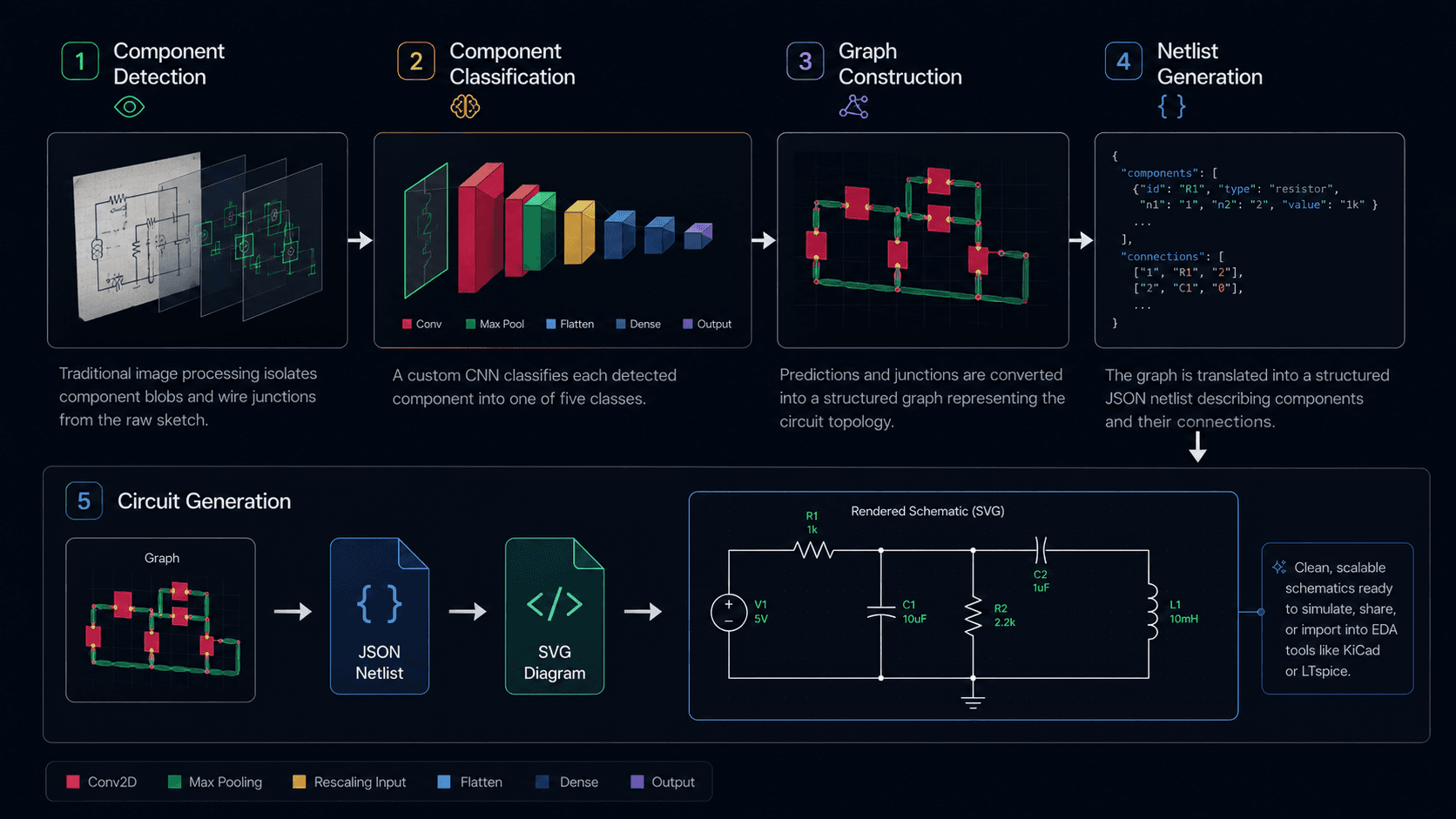
The pipeline runs in the following stages:
- Component detection: traditional image processing (adaptive thresholding, skeletonization, morphological closing) locates component blobs and wire junctions in the raw sketch, without needing a labeled detection dataset.
- Classification: a custom CNN classifies each detected component across five classes: resistor, capacitor, inductor, diode, and DC source.
- Graph reconstruction: component bounding boxes are compared against traced node contours to build a JSON netlist (modeled loosely on Yosys's format), which an SVG API renders into a schematic.
- Netlist Generation: the JSON netlist is converted into a netlist format suitable for EDA software
- Schematic Rendering: the netlist is rendered as an SVG diagram using an SVG API and custom routing algorithms. This also allows for the generation of diagrams in other formats.
Two open datasets from Kaggle and GitHub containing 500 labeled sketches were souced and cut down to 477 usable images after removing corrupted and mislabeled files. Nowhere near enough to train a CNN from scratch. Standard data augmentation was used to increase the dataset size: random rotation (±45°), translation, shear, flips, and zoom generated up to 20 variants per source image, taking the dataset from 477 to 9,556 images. It was chosen to match how differently people actually hand-draw the same resistor.
Making it fast on CPU
The deployment tareted inteded to be an edge device, so the classifier had to be small enough to run on a CPU. It is a compact 4-block CNN (four Conv2D + MaxPooling pairs) stepping from 32 to 128 filters, flattening into a 256-unit dense layer before the 5-way softmax around 1.4M parameters in total. That keeps it in the sub-15MB range, small enough to classify each cropped component in well under 400ms on CPU with no GPU in the loop.
Results
- 90% component-detection accuracy (traditional CV, no labeled detection data)
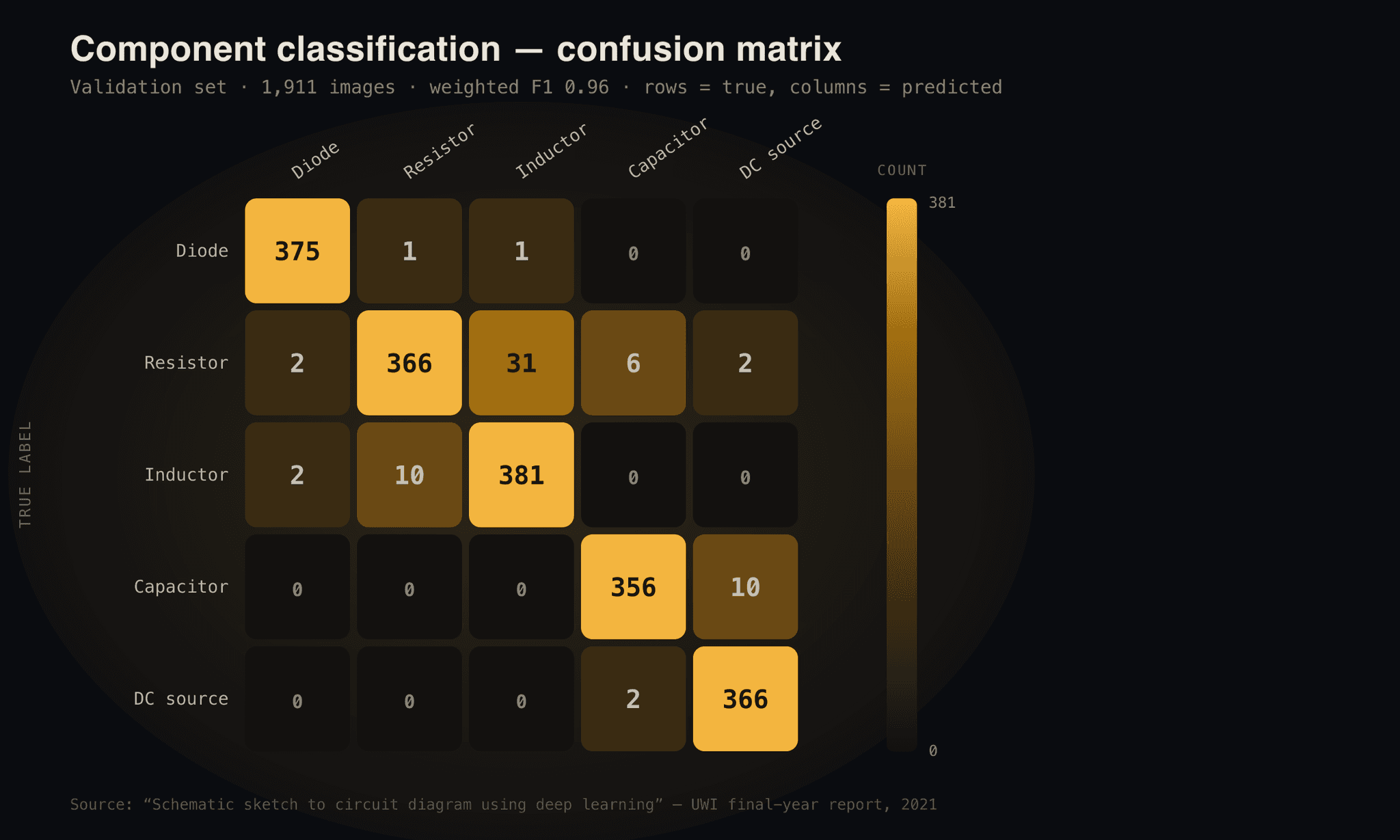
- 0.96 weighted F1 across five component classes (96.49% validation accuracy)
- Sub-400ms CPU inference per component
- Sub-15MB model footprint
- 60+ stars on GitHub
Conclusion
CircuitNet showed that rapid, hands-off digitization of circuit sketches is achievable—even with modest data and hardware—by blending established vision techniques with purpose-built deep learning. Automating this tedious step in the engineering workflow removed repetitive redraws and opened the door to faster feedback and iteration. There is a wide frontier left: broader symbol support, smarter segmentation, and real-time correction by users. But even as a prototype, CircuitNet streamlined an intensely manual process and hinted at what’s possible when classic engineering and modern ML are combined at the right interface in the workflow.